
I’ve been playing with a lot of summaries and agents lately, and I recently stumbled upon one that’s quite good (and rather easy to use) with Tasklet.
With Tasklet, you give a prompt for what you want and it’ll ask for clarifications and connections to build it out. For example, I started by simply asking it:
“Send me a daily briefing based on my Google Calendar, Gmail, and Granola.”
It asked some follow-up questions, and then had me click to add my connections (to Gmail, to calendar, etc). Voila!
Here’s where it gets really cool.
First, I was able to add multiple email accounts to it, which is a surprisingly large problem with many of these kinds of tools as most can only support one account at a time. I told it that I wanted to connect my [email protected] account as well as my [email protected] account, and it just clicked and set them up. Perfect.
Next, you’re able to give it more prompts to continue to streamline what it sends. In my case, it was sending me a lot of information about stuff in my inbox to pay attention to. That could be useful for some people, but not really to me. I know what’s in there, but I really just want an email that gives me more context on upcoming meetings. Two subsequent prompts from me were these:
“Only pull email and granola items as they related specifically to calendar events on the day.”
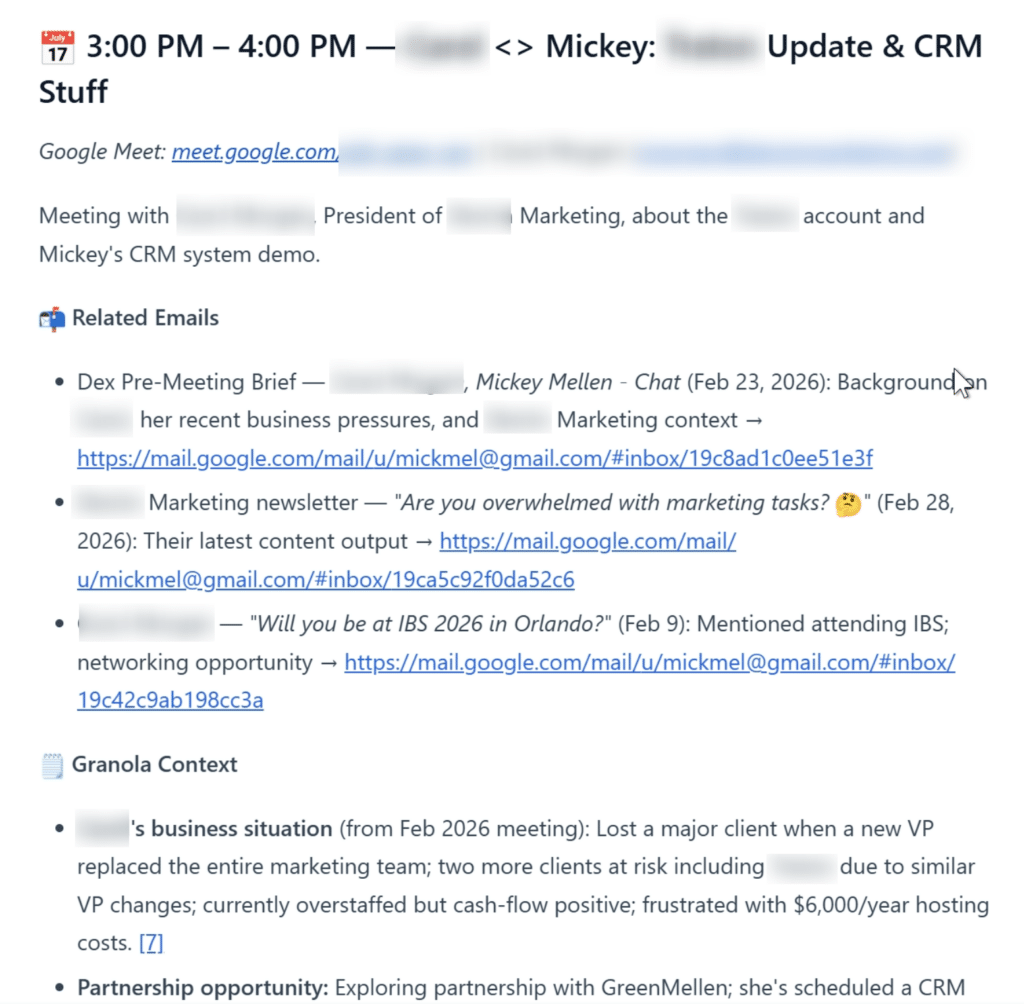
“That’s much better, but let’s organize it more. Put the email and granola context in the same space as the calendar event, so that I don’t need to scroll up and down the email for each event.”
It’s great! Here’s a snippet from a recent email:
I’m continuing to fine-tune it a bit more each day, and it’s proving to be quite helpful. I encourage you to check it out.