
When I’m reading, probably about 99% of the books I read are on Kindle. It’s simple, efficient, and makes highlighting super easy. Not only can I highlight on Kindle with a few taps, but I can easily grab them all from the Kindle website to pull into Roam Research (kind of like I describe here).
However, with my pile of books that I’m reading for the altMBA, I needed to find a way to easy highlight them. I figured I had three options.
- Readwise has a great mobile app that lets you snap pictures of a page of text, and it’ll covert it to digital text and let you highlight and save it. Pretty slick!
- I could grab a marker and literally highlight the book.
- I could use little “page marker” arrows to track highlights.
I discounted #1 because it seemed a bit of a disruption to reading. It may leave me in better shape at the end, but kind of a pain during to pull out the phone, take a picture, and then highlight each relevant passage.
With #2, I’d have to flip through every page of the book again to find and collect my highlights.
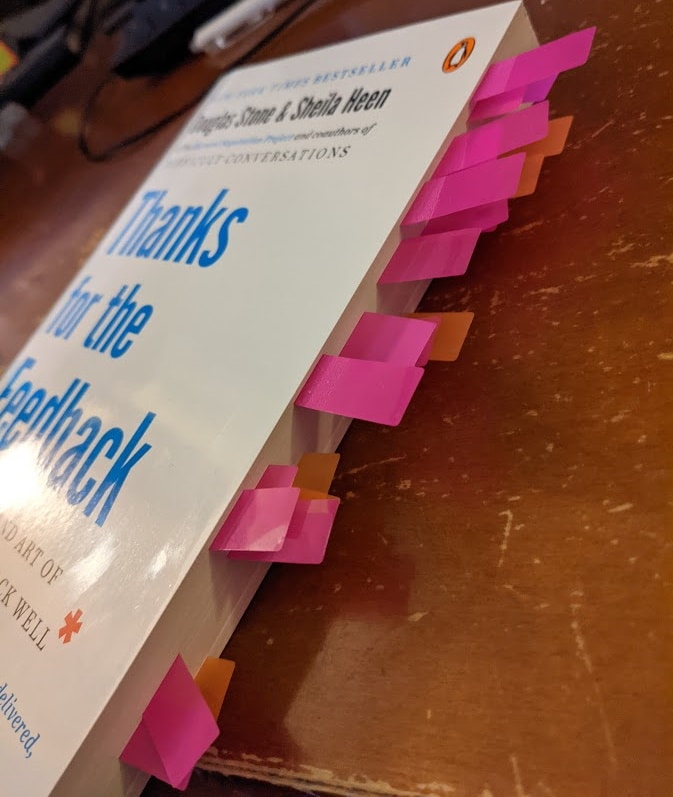
So, I went with #3 and it’s worked great! I bought a pack of super cheap arrows from Amazon (I got these, but there are literally hundreds of options that would work).
The result?
A messy looking book, but relatively quick to go to each tab, copy the text into Roam Research (ideally along with some of my own commentary on why I saved it), and then remove the tab to leave the book undamaged.
I’m curious about you. If you mark up one-time books for later learning (I’m not talking about things like the Bible, where permanent highlights and notes could be helpful), how do you choose to go about it?




When I was in college (in the late 70’s), I use old fashioned highlighters in various colors. And wrote notations in the margin with my commentary. When I was in grad school (in the early 2000’s) I used post- it arrows. I would write a word or two or three on the post-it in case I wanted to reread a section or if the professor referenced the textbook specifically during a lecture. Fast forward to 2021-I now use both! I put a post-it arrow on the pages where I have underlined something. I even use this method in my Bible studies so I can find a passage quickly.
Good ideas, Sharon! That’s a great way to handle it. Thanks for sharing!